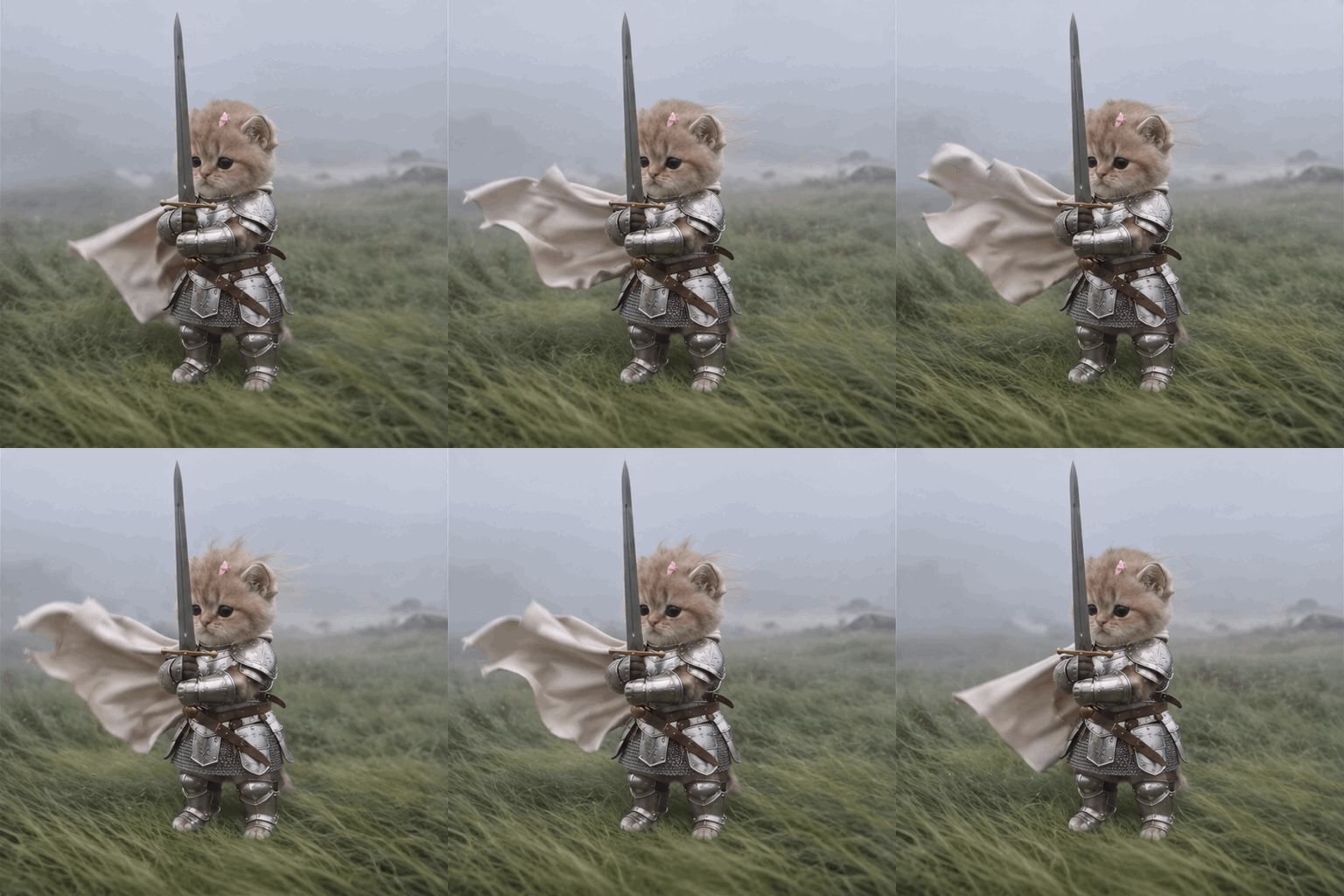
What GPT Image 2.6 GIF can do
Until recently, to make a GIF with AI you had to generate a video and then cut it in a converter. GPT Image 2.6 GIF arrived on KADR (kadr-ai.ru) on November 17, 2026 and outputs a finished animated file right away.
| Parameter | Value |
|---|---|
| Frames | 9, 200 ms each |
| Loop length | about 1.8 seconds, loops forever |
| Input | text, or text plus up to 4 photos |
| Formats | 1:1 (512×512), 16:9 (768×432), 9:16 (432×768), 4:3 (640×480), 3:4 (480×640) |
| Generation time | about 20 seconds |
| Sound | none |
| Price | 9 tokens, about 14 rubles |
It is important to understand the scale. Nine frames is not smooth video but a classic GIF with a slightly frame-by-frame feel. For a chat reaction, a sticker or an animated badge on a website that is exactly what you need. For a full-screen 1920 px banner the resolution is not enough.
How to make a GIF with AI: step by step
- Open KADR and choose the GPT Image 2.6 GIF model in the photo section.
- Choose the format. 1:1 for stickers and reactions, 9:16 for stories, 16:9 and 4:3 for newsletters and websites.
- Upload a photo if the GIF should be made from your picture. Up to four: for example, a product and a logo.
- Describe the scene and one movement. Russian works too. Not sure about the wording? Press «Improve».
- Start. The price is shown before you start, and in 20 seconds the GIF is ready. If you do not like the motion, change one word and repeat: an attempt costs 14 rubles.
How to make a GIF from a photo or a picture
Making a GIF from a photo is easier than from text: the look is already set, and the model only has to come up with the motion. The rule is the same as when animating a photo into a video: describe not what is in the picture but what changes.
Bad: «a ginger cat lies on a blue sofa by the window». The model can see that.
Good: «the cat slowly blinks and twitches the tip of its tail, the camera is still».
If you give it several photos, say what to take from each: «the character from the first photo holds the product from the second photo and winks». More on motion in photos: how to animate a photo with AI.
A prompt formula for a loop
A GIF plays in a circle, so the last frame has to flow smoothly into the first. Hence the formula:
what is in the frame + one repeating movement + «the camera is still» + «seamless loop» + style and background
Movements that read well in 9 frames: blinking, waving, swaying, bouncing, flickering fire, steam, falling sparkles, an object rotating, a heart or a button pulsing.
Movements that do not work: going from point A to point B, a scene change, complex choreography, camera movement. In 1.8 seconds they do not have time to finish, and the loop «jumps».
10 ready prompts
A «hi» reaction:
A cartoon raccoon waves its paw and smiles, the camera is still, seamless loop, bright colors, plain light yellow background.
An «OK» reaction:
A cartoon kitten gives a thumbs up and winks, a light bounce, seamless loop, flat illustration, white background.
«Good morning»:
A cup of coffee on a windowsill, steam rising above it, soft morning sun outside the window, the caption «Good morning» in large letters at the top, seamless loop, warm tones.
A product micro-animation:
A perfume bottle slowly rotates in place on a podium, a highlight runs across the glass, the camera is still, seamless loop, studio light, beige background.
A button for a newsletter:
An orange button with the word «Buy» gently pulses, small sparks flash around it, seamless loop, flat design, white background.
A sale banner:
The caption «30% off» on a red badge, confetti falls around it, the badge sways slightly, seamless loop, bright festive style.
A birthday card:
A cake with candles, the candle flames flicker, sparkles slowly fall from above, the caption «Happy birthday», seamless loop, watercolor style.
New Year:
A Christmas tree with a garland, the lights turn on and off one by one, snow falls outside the window, the camera is still, seamless loop, cozy illustration.
From a pet photo:
The dog from the photo tilts its head to the side and wags its tail, the camera is still, seamless loop.
A loading icon for a website:
A small paper airplane circles around, leaving a dotted trail, seamless loop, minimalist flat icon, white background.
Keep captions short, two or three words, and check every letter: on different frames they sometimes «drift» a little.
Where a GIF comes in handy
Reactions and stickers for Telegram. Just send the finished GIF to a chat: Telegram shows it as a looping animation. Long-press it and save it to GIFs, and it will be at hand in the GIF panel. An animated sticker is a different format: Telegram accepts video stickers in WEBM up to 3 seconds long with a 512 px side, so the GIF will need converting. How to build your own sticker pack: Telegram stickers with AI.
Newsletters. A GIF is the most reliable way to show motion in an email: most email clients do not play video. Keep in mind that some desktop versions of Outlook show only the first frame, so the main message should already read on it.
Banners for websites and social media. A small animated badge next to a product or in the corner of a page. Ideas and copy for promotions: sale banners with AI.
Product micro-animations. Rotation, a highlight, steam over food. On a social media card such a loop catches the eye better than a static photo.
Cards and greetings. «Good morning», happy birthday, Happy New Year. More ideas: greeting card with AI.
GIF or video: what to choose
| Task | What to use | Price |
|---|---|---|
| a 1.8 s loop without sound for a chat, email, website | GPT Image 2.6 GIF | 9 t (~14 ₽) |
| a 4 s clip with sound, a draft | Seedance 2.0 Mini, 480p | 10 t (~16 ₽) |
| a 4 s clip at 720p without sound | Veo 3.1 Lite | 14 t (~22 ₽) |
| a 6 s clip with sound at 720p | Seedance 2.0 Mini | 30 t (~47 ₽) |
KADR prices, November 2026. This is not a public offer.
In price, a short video costs barely more than a GIF, so choose by the task. A GIF is what you need when the file has to play on its own everywhere without a player: in an email, a chat, a web page. A video is what you need when smoothness, sound, a length over 2 seconds or camera movement matter. Seedance 2.0 Mini suits generated characters and objects, but not photos of real people: to animate your own portrait, use Veo 3.1 Lite.
How much it costs
| How many GIFs | Tokens | Rubles |
|---|---|---|
| 1 GIF | 9 | ~14 |
| 10 GIFs | 90 | ~142 |
| a set of 20 reactions | 180 | ~285 |
KADR prices, November 2026. This is not a public offer. The price does not depend on the format or on whether you upload a photo. You pay only for finished GIFs, with no subscription, and tokens never expire.
In short
You can now make a GIF with AI in one step: GPT Image 2.6 GIF outputs a finished GIF of 9 frames (a loop of about 1.8 seconds) from a description or a photo in 20 seconds for 9 tokens, about 14 rubles. Describe one simple repeating movement, keep the camera still and ask for a seamless loop.
For chats, stickers, newsletters and small banners, use a GIF. If you need sound, smoothness or a clip longer than 2 seconds, use video: Seedance 2.0 Mini or Veo 3.1 Lite.